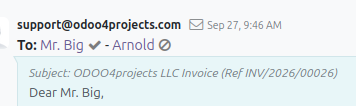
You hit Send, Odoo shows the email as sent, and then... nothing. Did the invoice actually leave your server? Did it land in the client's inbox, or in a spam folder? Did anyone open it? For anyone chasing payments, that silence is the hardest part of the process.
The good news: you don't have to guess. The OCA community maintains a small module called mail_tracking that adds real email tracking to Odoo's outgoing mail.
The problem with "sent"
Odoo tells you a message was generated and handed off to your mail server. That's a long way from "the client read it." Between those two points sit spam filters, bounces, wrong addresses, and inboxes nobody checks. Without tracking, all of those look exactly the same to you: silence.
What mail_tracking does
The module hooks into Odoo's outgoing mail flow and records tracking events against the messages Odoo sends. Instead of a binary sent/not sent, you get visibility into what happened after the message left — so an invoice that was never delivered stops looking identical to one that was delivered but ignored.
- See whether a message was actually delivered or bounced
- See whether the recipient opened it
- Check the status directly against the message, without leaving Odoo
- Use the tracking trail to decide when a follow-up call or reminder is actually warranted
The exact labels, screens, and available events depend on the version and branch you install, so read the module README for the branch you're running before you roll it out.
How to get started
- Open the OCA mail repository on GitHub: github.com/OCA/mail/tree/18.0/mail_tracking
- Check that the branch matches your Odoo version — the link above targets the 18.0 branch, so switch branches if you run something else.
- Read the README and installation notes carefully.
- Install and test it in a staging database first, using your own email address as the recipient.
- Send a test message and confirm the tracking data appears as expected before enabling it for real customer invoices.
Why it's worth the ten minutes
Most accounting follow-up is guesswork dressed up as process. You resend invoices that already arrived, or you wait politely on one that bounced weeks ago. Tracking turns that into a simple question with a real answer: did they get it, and did they open it?
If you send invoices or quotes from Odoo and you've ever wondered what happened after you clicked Send, take a look at the module. Start with the repository, check the branch for your version, and test it on a staging copy before you rely on it for customer communication.