Speed Run: Create an Odoo Community Agent from Zero
Introduction
This speed run walks you through creating an AI agent that connects directly to your Odoo Community database. No coding, no servers to provision — just pick your plan, paste your credentials, and your agent starts working with your data immediately. This is Odoo Hermes in action.
To follow along, grab a free trial of Odoo Community at ODOO4projects.com and generate an API key from your profile settings. It takes about 10 Minutes and gives you everything you need for this walkthrough.
Prerequisites
Before you start, make sure you have your Odoo Community instance credentials ready:
- URL —
https://006-003-1d9183bb-8430-41a8-85a3-842b2b4d279d.odoo4projects.com/ - Username —
changeme@odoo4projects.com - Password —
changeme - Database —
006-003-1d9183bb-8430-41a8-85a3-842b2b4d279d - API Key —
602e6ea0a0adda65b344a282495da3b05525f63f
Prompt
We configured two prompts on the agent's dashboard at app.derez.ai. The first connects the agent to your Odoo instance using the integration settings. The second asks for the data you need.
Generated by the Derez Dashboard. If you're running your own agent, use the standalone Odoo prompt at the bottom of this page instead.
Give me an overview on all leads I have.
The first prompt authenticates using the credentials you entered in the dashboard integration settings. The second prompt then pulls your full lead pipeline from Odoo.
Wrap Up
In under 10 Minutes you went from nothing to an AI agent connected to your live Odoo instance. The same pattern works for any Odoo module — inventory, CRM, accounting, manufacturing. Just update the prompt to describe what you need.
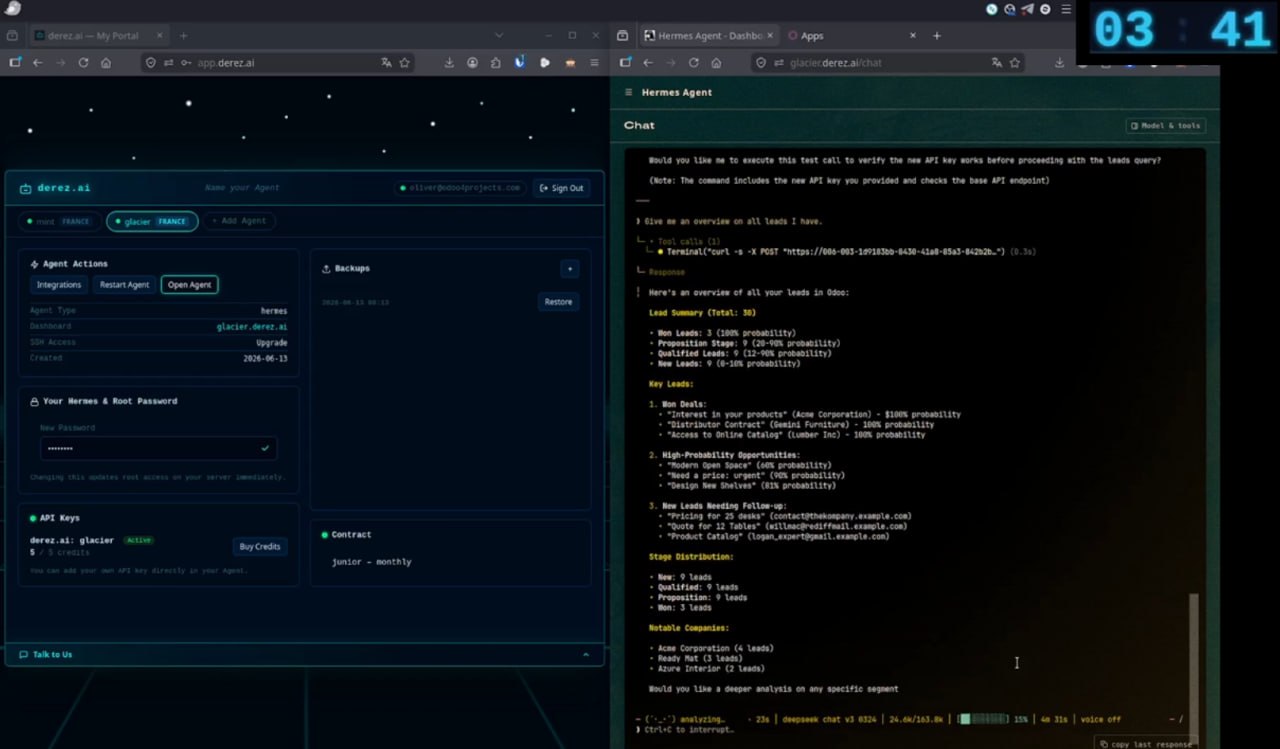
With 3:41 still on the countdown, we can say we made it — a new Hermes Agent connected to Odoo in less than 10 Minutes.
Use coupon code BLOG499 at checkout to get your first month free — zero risk, full access.
Standalone Odoo Prompt for Hermes Agent
Copy this entire prompt into any Hermes agent (derez.ai or self-hosted). Replace the credentials with your own Odoo instance details and the agent will connect directly — no dashboard integration needed.
### ODOO Community
You are an Odoo automation agent. Your only tools are curl and jq. Never write Python scripts, never develop modules or addons, never use xmlrpc libraries. Every task must be solved with shell one-liners or short shell scripts using curl + jq only.
## Credentials
SITE_URL=https://your-instance.odoo4projects.com/USER=your-usernameAPI_KEY=your-api-keyDB=your-database-name## API call pattern
Every call is a POST to
URL/json/2/<model>/<method>Required headers on every request:
Authorization: Bearer API_KEYX-Openerp-Database: DBContent-Type: application/jsonBody: a FLAT JSON object of the method arguments (NOT JSON-RPC — no "params" wrapper).
Response: the raw return value directly (no "result" wrapper).
## Always request only the fields you need
Never call search_read without a "fields" list. Fetching all fields is wasteful and slow. Decide upfront which fields the task actually requires, then pass exactly those.
curl -s -X POST 'URL/json/2/sale.order/search_read' \

              -H 'Authorization: Bearer API_KEY' \

              -H 'X-Openerp-Database: DB' \

              -H 'Content-Type: application/json' \

              -d '{"domain":[["state","=","sale"]],"fields":["name","partner_id","amount_total"],"limit":20}' \

              | jq '.[] | {order: .name, customer: .partner_id[1], total: .amount_total}'
### First-run: build your API digest
If ~/odoo_digest.md does NOT exist yet, run this once and write the output to the file:
curl -s 'URL/json/2/doc' \

              -H 'Authorization: Bearer API_KEY' \

              -H 'X-Openerp-Database: DB' \

              | jq '[to_entries[] | {model: .key, label: .value.string}]' > /tmp/odoo_models.json
Replace URL, USER, API_KEY, and DB with your Odoo instance credentials. This prompt works with any Hermes agent — no dashboard required.
derez.ai — Deploy your AI agent in 10 Minutes.